


Blood Pressure Diary by MedM
4.4157.00 Reviews
App Specs
- Version
- 3.10.5
- Updated On
- License
- Free
- Downloads
- 100,000+
- Developer
- MedM Inc
- Categories
- Medical
- Platform
- Android
Screenshots
 Analysis by AppCompare
When I want a clearer picture of a health habit, I’d rather have a simple record than rely on memory. That is the appeal of Blood Pressure Diary by MedM: it is a medical app focused on recording blood pressure, with space to make each entry more useful than a bare pair of numbers. I see it as a practical companion to a home monitor, not a device that measures blood pressure or a substitute for medical advice.
What to expect from the pace of use
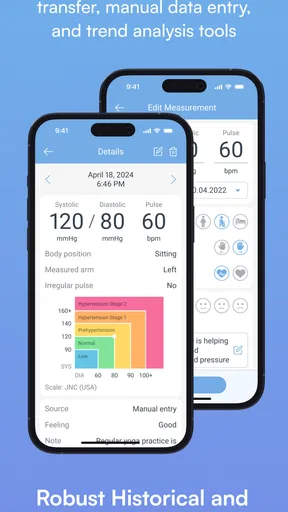
The basic workflow is designed around entering readings, so the app makes most sense when you want to record a result soon after taking it. A quick entry can include systolic and diastolic pressure and pulse, with a notes field for context. That straightforward approach is helpful when you are building a routine: you do not need to turn each check into a long data-entry session.
The store identifies it as a free app from MedM Inc, although it also offers in-app purchases priced from $5.99 to $99.99 per item. The app has a 4.4 average from around 2.4 thousand ratings, and it has been installed over 100 thousand times. It is rated for Everyone, runs on Android 5.0 or later, and its current version is 3.9.1513. I would treat those details as context rather than a promise that every feature or purchase will suit every user.
When regular use gets demanding
For someone who takes readings on a schedule, the useful test is not whether an app can display one number, but whether it remains manageable as entries accumulate. Graphs and charts help turn a set of readings into a trend you can inspect, while reminders can support a daily or weekly routine. The practical trade-off is that reminders only help if their timing matches the plan you are actually following; a prompt at the wrong moment can become easy to ignore.
A realistic routine might be to take a reading at the same point in the morning, record it promptly, and add a brief note if something relevant affected that check. For example, if you felt unusual symptoms, a short note can keep that detail beside the measurement instead of leaving you to reconstruct it later. I would keep notes concise and factual, so the record remains easy to scan rather than becoming a diary that takes longer to maintain than the measurement itself.
One useful habit is to enter readings consistently rather than trying to fill in a week from memory. Another is to use the notes field for context you may want to discuss with a clinician, not to diagnose yourself from a single result. That distinction matters: a graph can make a pattern easier to see, but it does not explain why the pattern occurred or tell you what treatment to choose.
Using the diary as a health record
I find this diary most useful when I treat it as a health record rather than a place to chase explanations for every reading. In this section, I’d focus on keeping entries consistent, adding only context that may matter later, and checking an export before sharing it. A small routine can make that record easier to trust; the next section considers what dependable use means in practice.
Worth Reading Before You Choose

Flipboard Shows What News Apps Must Do Beyond the Feed

Switching to Android Auto Means Rethinking Your Driving Routine

Google Calendar Makes a Crowded Week Easier to Manage

Ludo King Makes the Most of the Minutes Between Plans

Baby Panda World Brings Quick Play to Modern Phones, but Its Game Library Feels Busy

ESPN’s Live Game View Makes Following Close Games Easier
Reliability means a dependable routine
I would judge this kind of app’s reliability by how easily I can keep a usable record, not by treating it as a medical instrument. The app records information you enter; the accuracy of the numbers still depends on your monitor and on taking measurements correctly. If a reading looks surprising, I would follow the monitor’s instructions and any guidance from a healthcare professional rather than assuming the app can validate it.
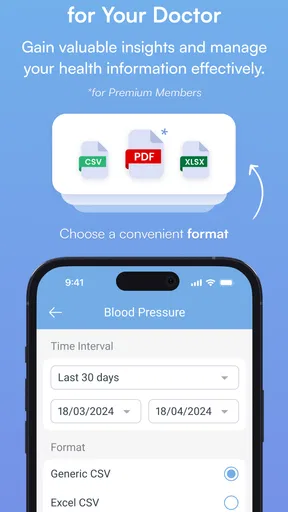
The export option is especially useful when preparing for an appointment. Instead of copying figures by hand at the last minute, you can share a file of recorded readings with your healthcare provider. I would check the exported record before sending it, making sure it covers the dates and measurements you intend to discuss. That small review can prevent a rushed appointment from turning into a search through scattered notes.
Where it fits among alternatives
Compared with a paper notebook, the app offers charts, reminders, and a way to export recorded information; paper, on the other hand, needs no phone and can be easier for someone who prefers handwriting. Compared with a broad health tracker, this diary keeps its attention on blood pressure rather than trying to be a general-purpose health hub. That focus is a strength if blood pressure is the main thing you want to follow, but a limitation if you expect one place to manage several kinds of health information.
The original setup experience is described as quick, with a clean interface and a few profile details such as age, weight, and height. That can make an initial visit feel less cluttered, but I would still take a moment to review what I enter and why. Personal information should be accurate when you choose to provide it, and I would not add details simply because a form asks for them unless they are relevant to how I plan to use the app.
Device limits and practical friction
This is an Android app with a minimum operating-system requirement of version 5.0. That makes device compatibility worth checking before planning a routine around it. If you use an older phone that cannot run it, or you prefer to keep health information off your phone, a paper log may be the more practical choice. The app is also not a replacement for a blood pressure monitor: you need a separate way to obtain the readings you record.
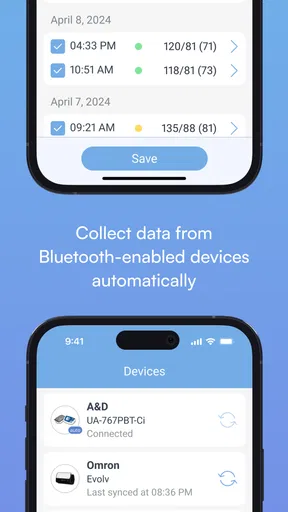
There is a difference between an app that stores useful entries and one that automatically collects data from equipment. The diary’s described workflow centers on manual entry, and the earlier experience noted that connections with fitness trackers or health-monitoring devices would be a welcome addition. If you already depend on automatic syncing across several devices, that is a meaningful trade-off to consider before choosing this as your main record.
What the app does well
First things first, downloading the app from the Play Store was a cinch. It didn’t take up much space, which is always a win in my book. Once I launched it, I was greeted with a clean, straightforward interface. No frills, no fuss, just the essentials. I appreciate that because, let's face it, when you’re trying to track your health, simplicity is key.
Setting up my profile was easy-peasy. The app prompted me to enter a few details like age, weight, and height, which helps in generating more accurate health insights. I liked that it was quick and didn’t bombard me with too many questions. I was ready to start logging my blood pressure readings in no time.
The Features That Stand Out
The Blood Pressure Diary by MedM aims to be your go-to app for tracking blood pressure, and it does a pretty solid job of it. Here’s what I found impressive:
- Seamless Data Entry: Adding a new reading is as simple as tapping a button. You can enter systolic and diastolic pressures along with pulse rate. There’s even a field for notes, which I found handy for jotting down any symptoms or observations.
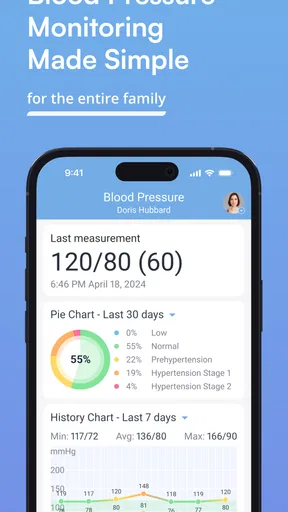
- Data Visualization: The app provides neat graphs and charts, giving you a visual representation of your blood pressure trends over time. It’s not just numbers on a screen; it’s a comprehensive view of your health.
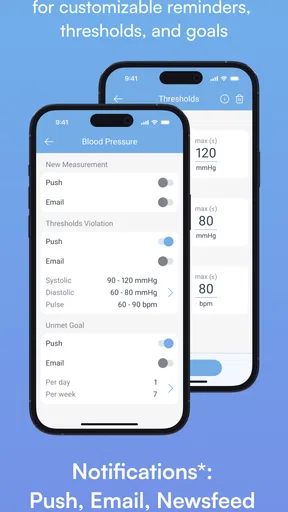
- Reminders: For someone like me who tends to forget to take readings, the reminder feature is a lifesaver. You can set daily or weekly reminders, so you never miss a beat—literally!
Why It’s Worth Your Time
We all know the importance of keeping an eye on blood pressure, especially if you have a history of hypertension. This app makes it ridiculously easy to track and understand your blood pressure patterns. The user-friendly interface is a big plus, and I love how it doesn’t overwhelm you with too much information at once.
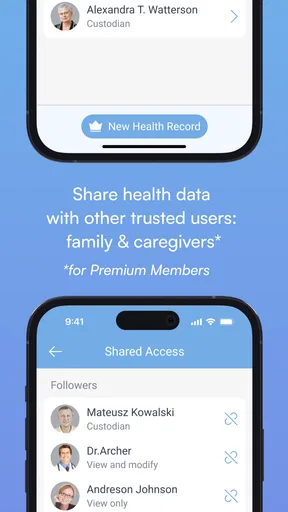
One feature that really caught my attention is the ability to export data. You can easily share your readings with your healthcare provider, which means no more scribbling notes before doctor visits. Just send over the file, and you’re good to go.
Room for Improvement
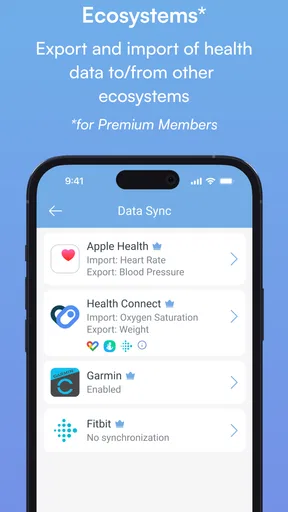
Of course, no app is perfect. While Blood Pressure Diary by MedM does a fantastic job, there are a couple of things that could make it even better. For instance, integrating with fitness trackers or health monitoring devices would be a great addition. It would be cool to see a feature that offers personalized health tips based on your readings.
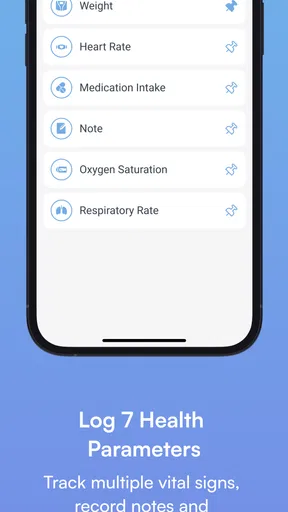
Another thing I noticed is that while the app is great for tracking blood pressure, it doesn’t offer much in terms of tracking other health metrics. If you're looking for a one-stop-shop health app, you might find this a bit limiting.
Who will get the most from it
I think this is best for people who already have a home blood pressure monitor and want a more organized alternative to loose paper or scattered phone notes. It can also suit someone helping a family member keep a record, provided they can enter readings carefully and agree on a consistent routine. If you want to track several health measures in one place, or expect automatic readings from connected equipment, a broader health platform or a device-specific app may fit better.
When deciding whether to use it, I would ask one simple question: will I actually record readings here after taking them? The app’s charts and export option become more valuable when entries are consistent; a half-filled log is less helpful than a small, reliable record. If you only need to preserve occasional results, a notebook may be enough. If regular tracking is part of your care plan, reminders and a visual history can make the effort easier to sustain.
Final Thoughts
All in all, if you’re in the market for a no-nonsense, effective blood pressure tracking app, Blood Pressure Diary by MedM is definitely worth checking out. It’s straightforward, reliable, and makes keeping track of your health a lot less daunting. Plus, with its clean design and practical features, it’s a tool you’ll actually want to use every day.
Whether you're managing hypertension or just want to be more proactive about your health, this app can be a valuable ally. So go ahead, give it a whirl, and take a step forward in your health journey!
My performance verdict
My overall impression is that the app is built for quick, repeated record-keeping rather than elaborate analysis. The reported experience of a light download and uncluttered screens supports that simple role, though actual responsiveness can vary by phone and app version. I would not make a health decision based on an assumption about speed or stability; what matters more is whether the log remains clear and accessible when you need to review it.
The most important limitation is also the clearest: this is a diary, not a monitor, clinician, or all-purpose health system. It can help you arrive at an appointment with a more organized history, but it cannot interpret that history for you. Used with a suitable monitor and sensible measurement routine, I see it as a focused tool for turning individual checks into a record that is easier to discuss and maintain.
Pros
- Easy-to-navigate interface for quick entries.
- Tracks multiple users' data efficiently.
- Custom reminders for medication and checks.
- Integration with wearable devices is seamless.
- Data export options for easy sharing.
Cons
- Limited customization of data fields.
- Ads can be distracting in free version.
- No automatic syncing with cloud services.
- Requires manual data input for accuracy.
- In-app purchases can be pricey.
FAQs for Blood Pressure Diary by MedM
What features does the Blood Pressure Diary by MedM offer?
Blood Pressure Diary by MedM offers a comprehensive set of features to help users monitor their blood pressure effectively. It includes easy data entry, graphical trends, and statistics. Users can also set reminders for measurements and medication, and export reports to share with healthcare providers. The app supports synchronization with various smart devices for seamless data tracking.
Is Blood Pressure Diary by MedM free to use?
The app offers a free version with essential features, making it accessible to everyone. However, there may be in-app purchases or a premium version that unlocks additional features, such as advanced analytics, ad-free experience, or expanded device compatibility. It's important to check the app store for detailed pricing information.
Can I use Blood Pressure Diary by MedM with my wearable device?
Yes, Blood Pressure Diary by MedM supports synchronization with a variety of smart devices and wearables. This allows users to automatically import blood pressure readings, ensuring data accuracy and convenience. Before downloading, check the app’s compatibility list to ensure your specific device is supported.
How secure is my health data in Blood Pressure Diary by MedM?
Blood Pressure Diary by MedM prioritizes user privacy and data security. The app uses encryption to protect data transmission and storage. Users are encouraged to review the app’s privacy policy to understand how their data is handled and to take advantage of any available security settings within the app.
Does Blood Pressure Diary by MedM provide any health recommendations?
While Blood Pressure Diary by MedM is a powerful tool for monitoring blood pressure, it does not provide personalized medical advice or recommendations. Users should use the app in conjunction with professional medical guidance. The app’s data can be shared with healthcare providers to help inform treatment decisions.


